Snap a school letter. We'll pull out the dates.
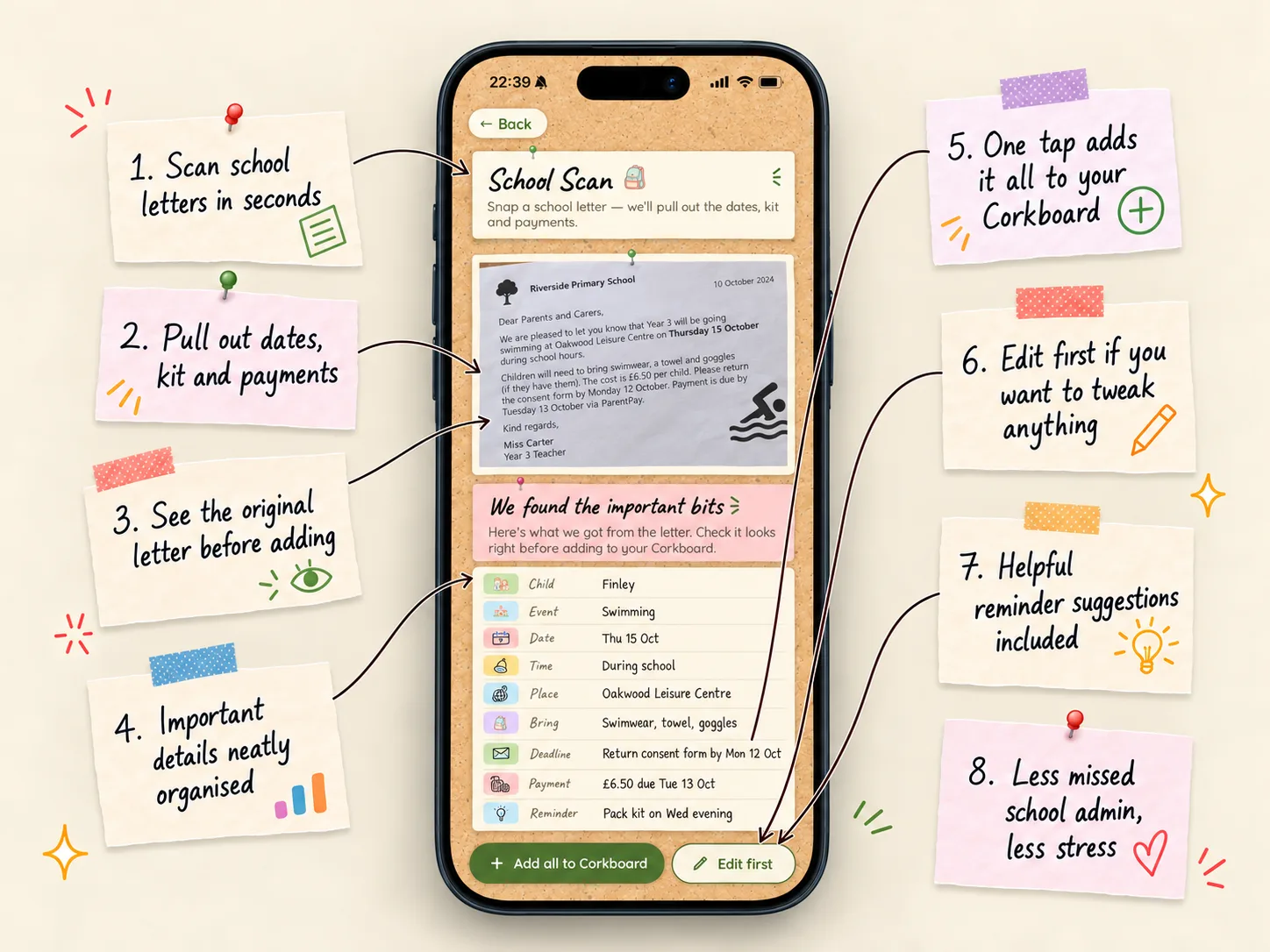
Take a photo of a letter from school and Little Corkboard finds the important bits: the date, what to bring, form deadlines and payments. Check them on one card, then add them all to your family planner in a tap.
Free to start · Made for iOS
Why scan a school letter?
School letters are full of things to remember, and they're easy to lose at the bottom of a bag. A trip date, a reply slip due Monday, £6.50 on ParentPay by Tuesday and a swimming kit to pack the night before can all be hiding in one page.
School Scan reads the letter for you and turns each of those into a planner note, so nothing gets forgotten once the letter's in the recycling.
What it finds
- The event itself, with its date, time and place.
- What your child needs to bring, such as swimwear, a packed lunch or wellies.
- Deadlines, like returning a consent form or reply slip.
- Payments, with the amount and the date they're due.
- A reminder to pack the kit the evening before.
- Which child it's for, matched from the year group on the letter.
You check it before it's added
Everything appears on a "We found the important bits" card first. If it all looks right, tap Add all to Corkboard. If something needs changing, like a date or who it's for, tap Edit first and fix it before anything is pinned.
If a photo is too blurry or isn't a letter, you'll be asked to try another, and that attempt doesn't use up a scan.
Your photo isn't kept
The photo is shrunk on your phone and sent to be read, then it's gone. Only the planner notes you choose to add are saved, the same as anything else on your board, and your family sees them there.
Questions parents ask
Is School Scan free?
Your first scan is free. After that, scanning as many letters as you like is part of Little Corkboard Plus. Anything you've already added from a scan always stays on your board.
Does it work with any letter?
It works best with a clear photo of a printed letter, newsletter or notice from a school, nursery or club, with the whole page in the frame and good light.
What if it reads something wrong?
You always see what it found before anything is added, and you can edit any detail first. Dates on old letters are checked so they land on the right day.
Can I use a photo I've already taken?
Yes. You can take a new photo or choose one from your photos, such as a screenshot of a letter that came by email.
Who can see the notes it adds?
Everyone on your family board, the same as any other note. The photo itself isn't saved.
Get the occasional tip
Calm ideas for running a family, plus news when Little Corkboard launches somewhere new.